Introduction:
The viewer is written using javascript, HTML and CSS. It runs completely on clientside using the browser (The internet is required to deploy the page, but then can be run offline). It is compatable with both continuous EDFplus and EDF formats, it does not read uncontinuous EDFpluse files. It has been tested on Chrome and Firefox.
Montage :
Montage tabopens once the file is chosen, and it can be called from 
It enables you to arrange channels into 3 categories:
EEG, EKG and Others
the EEG and EKG categories can be filtered unlike “Others”. Channels in these categories could be referrenced to another channel or could be displayed as they were saved in the EDF file after scaling by checking
“Others”category is for polygraph and any additional channels, moving the cruiser over the channel is going to display the value of the channel at that point.
The program uses the browser to save 6 montages. You can delete them by using  button which is located in the settings tab.
Navigation bar:
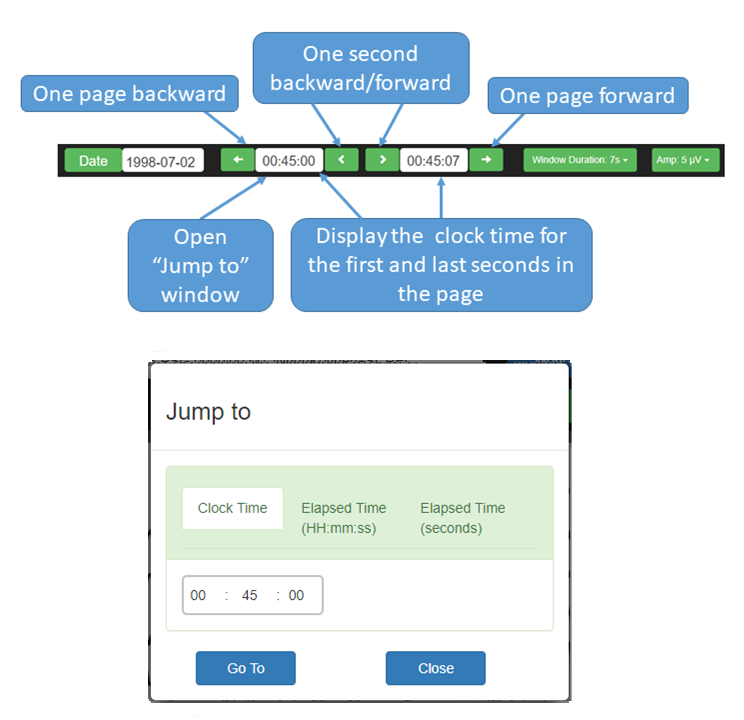
Jump to function is going to mark the time with a blue line.
Import Annotaions :
You can import Annotations from another EDFplus file using  located in annotaions table.
Both files should have the same begining date and time as well as the same duration.
Settings :
Keyboard Control :
Right Arrow: move one page forward.
Left Arrow: move one page backward.
Up Arrow: decrease EEG sensitivity (Voltage scale).
Down Arrow: increase EEG sensitivity (Voltage scale).
Space bar: start/stop auto scroll right.
Keyboard standard numbers [1-6]: Change montage to corresponding number.
Version :
This release is version 2.1
Contact :
Bilal Zonjy, MD
Email: bxz142@case.edu
License :
